Verifying Seed Mixing
Current Seed Guidance
Current firmware supports two different checks. verify_seed_mix.py checks a standard seed made from COLDCARD device entropy plus physical dice rolls or coin flips. The older rolls.py and rolls12.py tools check the separate Dice Rolls Only workflow. None of these tools supports Mash Keys. For an existing seed that may fall within the current firmware guidance, use the security status and its dedicated migration guide to evaluate the exact workflow and dice conditions.
Verify Standard Seed Mixing#
Mk4/Mk5 5.6.2 and Q 1.5.2Q added View TRNG Words to the standard seed-generation menu. It displays the complete 256-bit device-generated value as 24 BIP-39 words before your dice rolls or coin flips are mixed in.
The public-domain verify_seed_mix.py tool recomputes the final 12- or 24-word seed from those TRNG words and the complete dice-roll or coin-flip sequence. It has no dependencies beyond Python 3.
- Download
verify_seed_mix.pyfrom the COLDCARD firmware repository before taking the computer offline. - On the COLDCARD, choose
New Seed Words, select 12 or 24 words, then openView TRNG Wordsand transcribe all 24 words into the offline verification environment. - Return to the entropy menu. Choose
Dice RollsorCoin Flipsand enter the complete physical sequence. - Run
python3 verify_seed_mix.pyon the offline computer. Enter the 24 TRNG words, the method, the complete sequence, and the final seed length when prompted. - Compare the resulting words with the final seed shown by the COLDCARD.
Do Not Fund a Verification Wallet
The TRNG words, your complete dice or coin sequence, and the resulting seed words are wallet secrets. Notes, photographs, clipboard contents, terminal history, logs, and backups may keep them. Anyone who obtains the TRNG words together with your complete input can recreate the wallet and steal its funds.
Use a disposable run to prove the calculation, never fund that wallet, and erase the verification material. Then start over with new TRNG words and fresh, unrecorded rolls or flips for the wallet you will use.
Verify Dice Rolls Only#
Background#
Video: COLDCARD Dice Rolls seed entropy
You have the option of creating the seed value for your Coldcard by rolling a
six-sided dice (D6). Go to: New Seed Words > Advanced, and then choose
12 Word Dice Roll or 24 Word Dice Roll (for more detailed steps see
here). The COLDCARD warns that no
hardware-generated randomness will be included and that the final hash shown
while rolling is secret. Press ✔/ENTER to continue or
X/CANCEL to exit.
Enter each result from a fair six-sided die as it is rolled. Keep the full sequence private and do not record, photograph, or type it into a computer.
The Final Hash Can Recreate the Wallet
Anyone with the dice rolls or final hash can recreate your seed words and steal the funds. Never enter dice rolls intended for an actual funded wallet into a computer or connected device, and keep the COLDCARD screen hidden from people and cameras. Use a separate disposable set of rolls for verification, then generate the real wallet with a fresh set that never leaves the COLDCARD.
This makes the seed independent of the COLDCARD's built-in random-number path and lets you reproduce the calculation. The resulting seed is only as strong as the fair, private, and sufficient dice sequence used to create it. This is a seed-creation workflow, not an import of an existing private key.
Number of Rolls#
Please note that each roll of a D6 dice provides only 2.585 bits of additional entropy (randomness). Therefore, for 128-bit security, which we consider the absolute minimum, you need 50 rolls, and for 256-bits of security, 99 rolls. The Coldcard does not limit the number of rolls, but will warn you if you apply too few rolls.
After the seed backup has been checked, use a strong, unique BIP-39 passphrase for any wallet intended to hold an amount whose loss would be materially harmful to you. Back up the passphrase separately, record the passphrase wallet's fingerprint, and test recovery before depositing funds.
Duplicating Our Math#
But what if we lied and still used some tricky way to pick a non-random but random-looking value for the seed?
You may have noticed the first screen always looks like this:
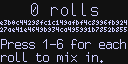
The seed value is calculated as SHA256 over the rolls, when
expressed as an ASCII string. Therefore, you will always see
e3b0c... 27ae4... b855 as a starting value, since that's
SHA256 over an empty string. You can calculate other values using
Python as follows:
>>> from hashlib import sha256
>>> sha256(b'').hexdigest()
'e3b0c44298fc1c149afbf4c8996fb92427ae41e4649b934ca495991b7852b855'
>>> sha256(b'123456').hexdigest()
'8d969eef6ecad3c29a3a629280e686cf0c3f5d5a86aff3ca12020c923adc6c92'
Values can also be calculated from the command line (shell) of most computers using one of the following commands:
$ echo -n 123456 | sha256sum
8d969eef6ecad3c29a3a629280e686cf0c3f5d5a86aff3ca12020c923adc6c92
$ echo -n 123456 | openssl sha256
(stdin) = 8d969eef6ecad3c29a3a629280e686cf0c3f5d5a86aff3ca12020c923adc6c92
The ideal environment to perform this checking is a computer running Tails - The Amnesic Incognito Live System, preferable without any network connection and no hard drives. Do not use your actual dice rolls on a normal desktop system as that will completely comprise the security of your Coldcard!
You may be worried that this hex number shown on the Coldcard is not honestly converted into the seed words. To check that we are applying BIP-39 correctly, you can use this simple python3 program: rolls.py or rolls12.py for 12 word seeds.
$ echo 123456 | python3 rolls.py
8d969eef6ecad3c29a3a629280e686cf0c3f5d5a86aff3ca12020c923adc6c92

WARNING: Input is only 15 bits of entropy

   1: mirror
   2: reject
   3: rookie
   4: talk
   5: pudding
   6: throw
   7: happy
   8: era
   9: myth
  10: already
  11: payment
  12: own
  13: sentence
  14: push
  15: head
  16: sting
  17: video
  18: explain
  19: letter
  20: bomb
  21: casual
  22: hotel
  23: rather
  24: garment


$ echo 123456 | python3 rolls12.py
8d969eef6ecad3c29a3a629280e686cf

WARNING: Input is only 15 bits of entropy

   1: mirror
   2: reject
   3: rookie
   4: talk
   5: pudding
   6: throw
   7: happy
   8: era
   9: myth
  10: already
  11: payment
  12: owner
As you can see, it shows the hash (which you can cross verify as above with other command-line tools) and then shows the corresponding BIP-39 mnemonic words.
Again, a Tails system is ideal for this verification process.
-
Get a copy of
rolls.py(orrolls12.pyfor 12 word seeds) onto the Tails system.-
After starting tails, use Tor Browser to visit
coldcard.com/docsand get back to this page. -
Download and save this file:
rolls.py= https://coldcard.com/docs/rolls.py -
For 12 word seeds download and save this file:
rolls12.py= https://coldcard.com/docs/rolls12.py -
Alternatively, you might use a flash drive to sneakernet the file.
-
-
Run your dice rolls through
rolls.py(orrolls12.py):-
In Tails, open "Applications > System Tools > Terminal".
-
Type this sequence of commands:
-
$ cd "Tor Browser"
$ ls
-
You should see the
rolls.py(orrolls12.py) program you downloaded already. If you used some other means to get it into your Tails system, go to the directory where it's located. -
Further Internet access or write access to any media is not required or desired past this point.
-
Type this:
$ echo 123456 | python3 rolls.py
# or
$ echo 123456 | python3 rolls12.py
-
It should print the hash and seed words shown above (
8d96...6c92andmirror..garment). -
Repeat but using the dice rolls you provided to Coldcard. Both should arrive at the same set of seed words.