Verify Address Ownership
Why Verify Address Ownership?#
The COLDCARD® Q and Mk4 have the ability to verify that a Bitcoin address presented via QR code (Q only) or NFC (Q and Mk4) is actually part of a wallet on the COLDCARD. This includes multisig addresses, and can also include addresses from non-standard accounts the user has interacted with.
This feature automates the process of a user searching the address explorer manually to verify address ownership, and is optimized for speed.
Danger of Not Verifying Address Ownership
Failure to verify address ownership can leave you vulnerable to attacks via compromised mobile or desktop wallets that may be displaying addresses not generated by your COLDCARD.
Verify an Address from QR Code (Q only)#
-
Initiate the QR code reader by either pressing the QR button, or navigating to the
Scan Any QR Codeoption on the main menu. -
Scan QR code of a Bitcoin address or a BIP-21 payment URI.
-
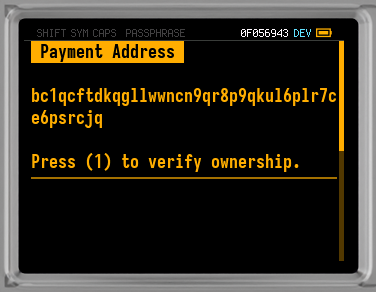
You'll be presented with a screen showing the address from the QR code, and instructions to verify ownership.
-
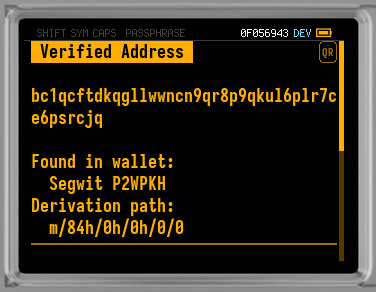
Press 1 and the COLDCARD will attempt verification. If the address is part of a wallet the COLDCARD knows about, then you will see a screen with the following information:
Verified Address: The address is verified to come from a wallet on this COLDCARD.- The address in question.
Found in wallet: Which wallet the address was found in.Derivation path: The exact derivation path where this address can be found.- For a single-signature wallet,
Press (0) to sign message with this key. - If the address is found in the WIF Store, the screen shows
Found in WIF store at index Ninstead of the wallet name and derivation path.
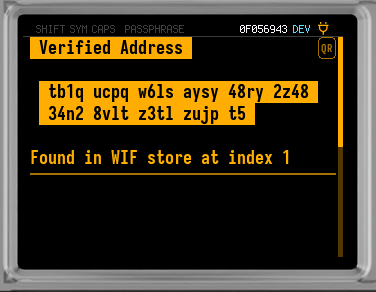
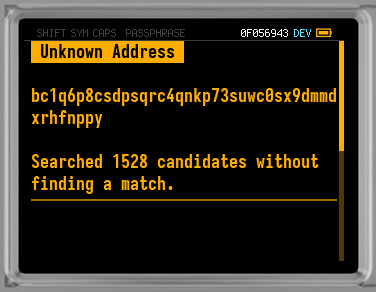
If the address is not part of a wallet the COLDCARD knows about, then you will see a screen with the following information:
Unknown Address: The address could not be verified to come from a wallet on this COLDCARD.- The Bitcoin address in question.
- Number of candidate addresses checked without finding a match.
Verify an Address from NFC (Q or Mk4)#
-
Ensure NFC is enabled on the COLDCARD as explained in NFC Tools.
-
Go to the NFC menu by pressing the NFC button (Q only), or navigating to
Advanced/Tools > NFC Toolsfrom the main menu.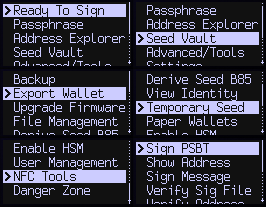
-
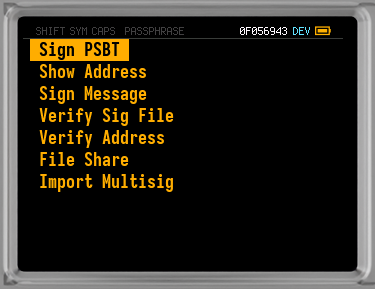
Once you arrive at the NFC Tools menu you should select
Verify Address. -
The COLDCARD is now ready to accept data from the tap of an NFC enabled device. Tap the device to the COLDCARD.
-
The COLDCARD will recognize a Bitcoin address and immediately begin verifying if the address is part of a wallet the COLDCARD knows about.
-
If the address is part of a wallet the COLDCARD knows about, then you will see a screen with the following information:
Verified Addresson Q, orVerified!on Mk4: The address is verified to come from a wallet on this COLDCARD.- The Bitcoin address in question.
Found in wallet: Which wallet the address was found in.Derivation path: The exact derivation path where this address can be found.- For a single-signature wallet,
Press (0) to sign message with this key. - If the address is found in the WIF Store, the screen shows
Found in WIF store at index Ninstead of the wallet name and derivation path.
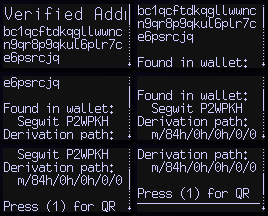
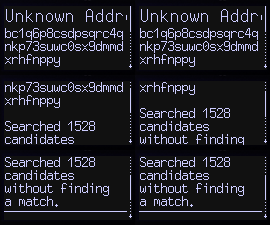
If the address is not part of a wallet the COLDCARD knows about, then you will see a screen with the following information:
Unknown Address: The address could not be verified to come from a wallet on this COLDCARD.- The Bitcoin address in question.
- Number of candidate addresses checked without finding a match.
Wallet Hint via BIP-21#
(new in Mk4 v5.4.4 / Q v1.3.4Q)
When verifying ownership from a BIP-21 payment URI — via QR scan on the Q, or NFC on either model — an optional non-standard wallet=<name> query parameter restricts the search to a single named wallet on the COLDCARD. This hint applies to named multisig wallets (and to Miniscript wallets on the Edge firmware branch); it has no effect on standard single-signature derivations.
For example, scanning:
bitcoin:bc1q…?amount=0.001&wallet=Treasury
tells the COLDCARD to look for this address only inside the multisig wallet named Treasury. The name is case-sensitive and must match the wallet name shown under Settings > Multisig Wallets. If no wallet by that name exists, the verification fails with:
Wallet '<name>' not defined.
Other multisig wallets, and single-signature derivations, are not searched while a wallet= hint is in effect. Omitting the parameter falls back to the default behaviour: every defined multisig wallet plus standard single-signature derivations are tried, in order, until a match is found.
This extension is COLDCARD-specific and may be ignored by other wallet software that processes the same URI.
Limitations of Address Ownership Verification#
- Only the first 1,528 addresses of a wallet (764 receive addresses, and 764 change addresses) are searched. An address outside of that scope will have to be verified manually using the address explorer.
- Only standard derivation paths are searched, unless the user has interacted with an account outside of the standard derivation.
- Imported keys in the WIF Store are also searched, except for P2TR and P2WSH address types. Matches from the WIF Store show
Found in WIF store at index Ninstead of a wallet name and derivation path. - The search can take up to 2 minutes on the initial run, but after that it should be much faster.