BIP-322 Signing#
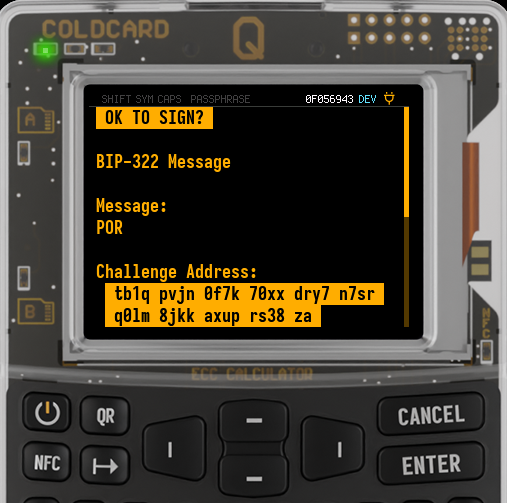
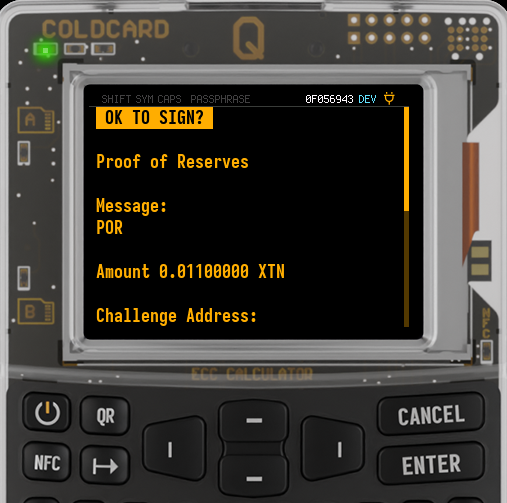
BIP-322 is a Bitcoin message-signing standard that works with modern Bitcoin scripts, not just old 1... legacy addresses.
On COLDCARD®, BIP-322 signing uses a specially built PSBT. You review the request on the COLDCARD, approve it, and get back a signed PSBT. That signed PSBT is handed back to the wallet, verifier, exchange, auditor, or other tool that created the request.
BIP-322 PSBT signing was introduced in Mk4/Mk5 v5.5.0 and Q v1.4.0Q. After BIP-322 moved to its final form, Mk4/Mk5 v5.5.1 and Q v1.4.1Q updated COLDCARD to the completed flow, where the message is carried inside the PSBT. Earlier draft requests that ask you to provide the message separately are not the current flow.
The message must be inside the PSBT
Current COLDCARD firmware follows the completed BIP-322 PSBT flow. The PSBT must include PSBT_GLOBAL_GENERIC_SIGNED_MESSAGE. COLDCARD reads the message from that PSBT field and shows it on-screen.
If a tool gives you a BIP-322 PSBT and then asks you to import or type the message separately on the COLDCARD, that tool is using an older draft flow. Update the tool or create a new request.
What It Does#
BIP-322 proves that a signer can satisfy a Bitcoin script for a specific message.
There are two common COLDCARD cases:
| Screen label | What it means | What it proves |
|---|---|---|
BIP-322 Message |
The PSBT has only the BIP-322 challenge input. | COLDCARD can sign for the shown challenge address or script. |
Proof of Reserves |
The PSBT has the BIP-322 challenge input plus one or more real UTXO inputs. | COLDCARD can sign for the shown reserve UTXOs, without moving them. |
BIP-322 is not limited to single-signature addresses. The challenge address can be a script-based wallet address, including multisig. In that case, COLDCARD signs for the keys it controls, just like it does when signing a normal multisig PSBT.
For multisig proofs, make sure the wallet or coordinator builds the BIP-322 PSBT with the required scripts and key-path information. If the proof needs more signatures than this COLDCARD can provide, the signed PSBT must be passed to the other cosigners before it can be finalized and verified.
The proof is not a normal transaction. It has a zero-value OP_RETURN output and includes a BIP-322 challenge input that cannot exist on-chain, so the signed result is not broadcastable and does not move funds.
Privacy
A proof-of-reserves PSBT reveals the UTXOs you choose to prove, and often reveals enough scripts, public keys, derivation hints, and wallet structure for the verifier to link those coins together.
Only include UTXOs you actually intend to disclose to that verifier.
Before You Sign#
You need three things:
- Firmware that supports the completed BIP-322 PSBT flow: Mk4/Mk5 v5.5.1 or later, or Q v1.4.1Q or later.
- A wallet, exchange, auditor, or command-line tool that can create a BIP-322 PSBT.
- The exact message you expect to sign, shown inside the PSBT.
The message should be plain and specific. Good examples:
Proof of reserves for Example Exchange, 2026-07-02
Account check 2026-07-02.
COLDCARD accepts messages from 2 through 330 ASCII characters. Newline and tab are allowed; all other characters must be printable. Leading or trailing spaces and any run of three spaces are rejected. Unsupported text, including non-ASCII characters, is rejected before the approval screen.
Signing Steps#
The PSBT is imported the same way as a normal transaction PSBT:
- MicroSD card: save the file with a
.psbtextension and chooseReady To Sign. - Virtual Disk: save the
.psbtfile to the COLDCARD virtual drive. - USB: send the PSBT with a compatible tool such as
ckccor HWI. - NFC: use
Advanced/Tools > NFC Tools > Sign PSBT. - QR or BBQr on Q: scan the PSBT if your wallet can encode it that way.
After import, COLDCARD recognizes the BIP-322 PSBT shape automatically. The approval screen title is OK TO SIGN?, not OK TO SEND?.
If You See BIP-322 Message#
This is a message-signing request with only the BIP-322 challenge input.
Review:
- The
Messagetext. - The
Challenge Addressshown by COLDCARD. - Any warning shown above the request.
You should see wording like:
BIP-322 Message

 Message:
 Account check 2026-07-02.

 Challenge Address:
 bc1q...

 Press ENTER to approve and sign message.
 Press (2) to explore transaction.
 CANCEL to abort.
If the message or address is not what you expected, cancel.
If You See Proof of Reserves#
This is a proof-of-reserves request. It has the BIP-322 challenge input plus reserve UTXOs.
Review:
- The
Messagetext. - The reserve
Amount. - The
Challenge Address. - The number of inputs and outputs.
- Any warnings shown above the request.
You should see wording like:
Proof of Reserves

 Message:
 Proof of reserves for Example Exchange, 2026-07-02

 Amount 0.20000000 BTC

 Challenge Address:
 bc1q...

 21 inputs
 1 output

 Press ENTER to approve and sign proof of reserves.
 Press (2) to explore transaction.
 CANCEL to abort.
There is no network fee shown, because this is not a spendable Bitcoin transaction.
Explore Before Signing#
Optionally, press 2 from the approval screen to inspect the transaction details.
For BIP-322:
- Input
0is the BIP-322 challenge input. It is expected to be zero-value. - Inputs after
0are the reserve UTXOs, if this is a proof-of-reserves request. - Output
0is a zero-valueOP_RETURN.
For a proof of reserves, pay attention to the reserve inputs. Those are the coins you are disclosing to the verifier.
Approve and Export#
Press ENTER to sign.
COLDCARD returns a signed BIP-322 PSBT. It does not return a broadcastable transaction, and it does not push anything to the Bitcoin network. This is true even if the host asks COLDCARD to finalize the PSBT over USB.
Give the signed PSBT back to the same tool, verifier, or coordinator that created the request. That external tool is responsible for finalizing the BIP-322 proof and verifying it.
Depending on the tool and proof type, the final BIP-322 proof may later be shown as text beginning with smp, ful, or pof. COLDCARD's handoff artifact is still the signed PSBT.
Verifying the Result#
The verifier needs:
- The original message.
- The challenge address or script.
- The signed BIP-322 proof.
- For proof of reserves, the UTXOs being proven.
For a simple BIP-322 message, the verifier checks that the signature satisfies the challenge address or script for the exact message.
For proof of reserves, the verifier also checks the extra UTXO signatures. To prove those UTXOs are currently unspent, the verifier must check the blockchain. An offline verifier can check the signatures, but cannot know whether the UTXOs have already been spent.
WIF Store Keys#
BIP-322 PSBTs can also be signed by keys imported into WIF Store, when the PSBT identifies a key that exists in the store.
During review, COLDCARD shows a warning such as WIF store: 0 or a list of WIF Store input indexes. Treat this as a normal warning: review it, confirm those are the keys you intended to use, and cancel if anything is unexpected.
Troubleshooting#
| What you see | What it usually means |
|---|---|
OK TO SEND? |
This is being treated as a normal transaction, not a BIP-322 PSBT. Cancel unless you meant to sign a real spend. |
| No message is shown | The request is not using the completed BIP-322 PSBT flow. Cancel and rebuild the PSBT with PSBT_GLOBAL_GENERIC_SIGNED_MESSAGE. |
Invalid PSBT with msg |
The BIP-322 message is missing or empty. |
Invalid PSBT with msg len |
The message is longer than COLDCARD's 330-character limit. |
msg too short |
The message contains fewer than two characters. |
Invalid PSBT before approval for otherwise valid BIP-322 structure |
The message may contain non-ASCII or other unsupported text. Rebuild it using the allowed character set. |
too many spaces, leading space, or trailing space |
The message contains ambiguous whitespace rejected before approval. |
invalid BIP-322 'to_spend' |
The message, challenge script, input 0, or UTXO data does not match the BIP-322 construction. |
Missing own UTXO |
The PSBT did not include the required UTXO data for an input. |
Missing redeem/witness script |
The PSBT creator omitted scripts required for wrapped Segwit or P2WSH signing. |
POR not SIGHASH_ALL |
The request uses a sighash type COLDCARD will not sign for BIP-322. |
PSBT does not contain any key path information |
The PSBT does not tell COLDCARD which of its keys should sign. |