MicroSD Card Related
Background#
On the left side of the COLDCARD® is a MicroSD card slot. When needed, the COLDCARD will access the files on that card as a means to interact with the rest of the world without using the USB port.
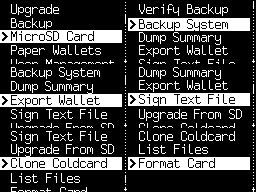
Many features requiring a MicroSD card are listed in Advanced/Tools > File Management:
MicroSD Functions#
Detailed information and instructions are linked in the function description.
Verify Backup - Performs a CRC32 check on your backup file.
Backup System - Encrypts everything you need to regain access to your funds (wallet seed and settings) as a 7z archive and saves it to your MicroSD card.
Dump Summary - Saves a text file containing a summary of the public details of your wallet. Includes the extended public key (XPUB) for importing to a software wallet.
Export Wallet - Use this option to create data files for various wallets. Allows you to import data while keeping your COLDCARD offline.
Options include:
SparrowCoveBitcoin CoreNunchukBull BitcoinBlue WalletElectrum Wallet- Read Using COLDCARD Offline (with Electrum 4.0.3).Wasabi WalletFully NodedUnchainedTheyaBitcoin SafeZeusSamourai PostmixSamourai PremixDescriptorGeneric JSONExport XPUBKey ExpressionDump Summary
Sign Text File - Add a Bitcoin signature to a file already on your MicroSD card.
Batch Sign PSBT - Sign multiple PSBT files from MicroSD in one pass.
Verify Sig File - Verify a detached signature file.
Firmware upgrades from MicroSD are available from Advanced/Tools > Upgrade Firmware > From MicroSD.
Clone Coldcard - Use this feature to turn an extra, blank COLDCARD into a copy of another COLDCARD.
List Files - Inspect, hash, sign, rename or securely delete files on the active MicroSD card, or on the Virtual Disk when no card is inserted.
Format SD Card - Formats the inserted MicroSD card and builds a new file system. Please note, formatting does not create a secure erase of the contents.
Format RAM Disk - Formats the Virtual Disk when Virtual Disk is enabled.